
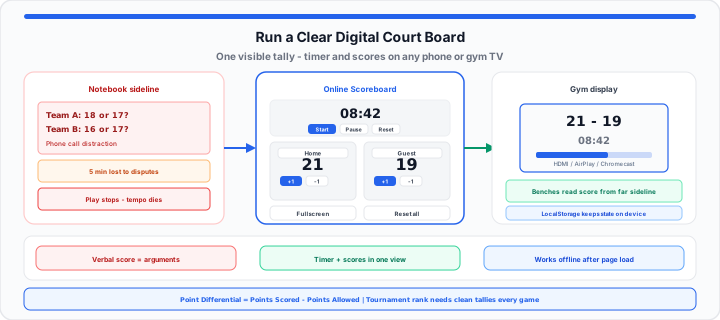
It happens midway through every single adult rec-league basketball game or Sunday pickup soccer match. Someone drives to the rim, scores a contested layup, and immediately a shouting match erupts over whether the score is 18–16 or 17–17 because the volunteer on the bench got distracted by a phone call.
When I’m refereeing local double-headers, watching a game devolve into an argument over forgotten points is the fastest way to ruin court tempo. Trying to track match points on a wrinkled notebook or keeping the count in your head is like managing an unnumbered ticket line at an airport gate—without a single, clear visual beacon that players and fans can scan instantly from across the floor, your entire match architecture collapses under the weight of split-second scoring disputes.
The Hidden Friction of Unofficial Scorekeeping
In our pickup league testing, relying on verbal announcements or scribbled clipboards creates an invisible drag on game speed. Every time a team questions the tally, players stop running, the whistle blows, and five minutes of precious court time evaporates while captains audit past possessions.
The problem compounds when tournaments rely on tiebreaker metrics like point differential to determine who advances to the playoff bracket. When standings depend on accurate math, a single miscounted set in volleyball or a forgotten goal in recreational soccer skews the whole tournament ladder.
Point Differential = Total Points Scored − Total Points Allowed
If your scoring records are messy, calculating rank indexes becomes impossible. Players need to see their standing in real time so they can adjust aggressive play or clock-management strategies without pausing the game to ask the scorer’s table for an update. Sum season totals and verify ladder math on the Average Calculator when leagues publish points-for and points-against columns, and express margin as a share of total points on the Percentage Calculator.
Instant court board: Rename teams, set period minutes, and tap +1 on our Online Scoreboard. Open Fullscreen so both benches read the same official tally from mid-court.
Step-by-Step: Setting Up a Digital Court Board in 4 Steps
To get started transforming a standard mobile device, tablet, or laptop into a bright, stadium-grade tally monitor, you do not need expensive physical flip-boards or complex hardware installations. Follow these four procedural steps to deploy a live board on any court or field:
- Launch the web interface on your primary control device: Open the Online Scoreboard in a mobile browser on a tablet or smartphone positioned securely at the scorer’s table.
- Configure team identities and match parameters: Replace Home and Guest with team handles, enter whole minutes for the period length, and click Reset on the timer while paused to load that duration.
- Cast or mirror the display feed to a public monitor: Tap Fullscreen, then output your screen onto a gym television, sideline monitor, or wall projector using native screen-casting, AirPlay, or a standard HDMI cord.
- Execute rapid single-tap point updates during live play: Tap +1 when a team scores and −1 to fix a mis-tap. Use Start and Pause on the countdown clock between whistles without leaving the board.
Modular touch fields allow instant score increments with zero menu navigation. Scores never drop below zero, so quick corrections do not require wiping the whole match. State saves to LocalStorage on the control device until you click Reset all or clear site data.
Pacing and Periods: Managing the Clock Without Dedicated Timers
In practical environments, running a clean athletic event requires managing time just as strictly as points. A standalone physical stopwatch creates extra friction because a solo official has to fumble between a phone clock, a whistle, and a paper clipboard.
A unified web-based score hub combines numeric scoring nodes with an integrated period countdown clock on one screen. When one tap pauses the match timer while scores stay visible, referees maintain control over game pace without needing a full crew at the scorer’s desk. For interval-only drills without team points, run parallel timing on the Online Timer or lap splits on the Online Stopwatch.
Remaining Seconds = (Minutes × 60) − Elapsed Seconds
Example: a 10-minute half loads as 10:00. After two minutes of running time, 600 − 120 = 480 seconds remain, shown as 08:00 in MM:SS format on the board.
The League Blueprint: Match Formats and Scoring Logic
Across our rec leagues, different sports demand distinct display configurations. A best-of-three volleyball set uses rally scoring with specific set-point caps, whereas a 3x3 basketball game relies on a fast-paced 12-minute running clock.
| Sport / Match Profile | Target Scoring Logic | Period Structure | Primary Interface Requirement |
|---|---|---|---|
| 3x3 Basketball | First to 21 points or highest at 10 mins | Single continuous period | Large digits + fast +1 taps and visible countdown |
| Rally-Scoring Volleyball | First to 25 points (win by 2) | Best 2 out of 3 sets | Reset scores each set; rename teams per set if needed |
| Recreational Soccer | Total goals accumulated | Two 20-minute running halves | Running match clock + goal +1 buttons |
| Table Tennis / Pickleball | First to 11 or 15 points | Best of 3 or 5 frames | High-contrast fullscreen numeric blocks |
| Amateur Esports (FPS/MOBA) | Best-of-three game wins | Round-by-round increments | Custom team handles and series win counters |
Moving onto court logistics, instead of straining your voice to yell out the score after every point, you can launch our interactive scoreboard online on any smartphone or tablet to keep both benches aligned on the official tally. Gym operators logging doorway traffic during tournament weekends can cross-check crowd counts with the retail foot traffic tally guide and the CPS Test.
Open Online Scoreboard Set Period Timer
Frequently Asked Questions
- How can I cast an online scoreboard to a larger gym television or projector?
- Open the Online Scoreboard, tap Fullscreen, then mirror with Chromecast, AirPlay, or HDMI from the device that controls +1.
- Will an online browser-based scoreboard reset if my device loses internet access during a game?
- No. After load, timing and scores run locally and persist in LocalStorage on that device until you reset or clear site data.
- What is the easiest way for a single referee to track scores and match timers simultaneously?
- Use one tablet at the table with large +1, −1, Start, and Pause controls on the same screen.
- Can I use a digital scoreboard for outdoor sports games in direct sunlight?
- Yes. Use Fullscreen, max brightness, and shade the device when possible for outdoor readability.