
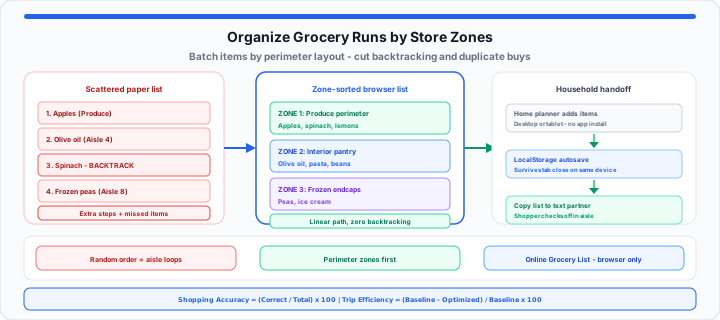
We have all stood in a crowded checkout lane, staring at a cart full of food, only to realize the single most important ingredient for dinner is still on a shelf four aisles back. Even worse is getting home, opening the refrigerator, and finding three extra cartons of sour cream because a reminder text got buried under work notifications.
Scattering household shopping needs across sticky notes, paper scraps, and endless chat threads is the organizational equivalent of packing a suitcase by throwing heavy winter boots directly on top of fresh strawberries. If you do not segment ingredients into functional spatial blocks before walking through the automatic doors, your entire shopping run collapses under the glare of supermarket lighting.
The Hidden Cost of Paper Lists: Why Scattered Notes Drain Your Time and Budget
In my experience coordinating group shopping trips and household meal plans, paper checklists consistently fail at the point of execution. A paper list is static, fragile, and easy to leave behind on the kitchen island. More importantly, handwritten notes encourage linear, random writing—you write down milk when you think of milk, and olive oil five minutes later when you check the pantry cabinet.
When you enter a store with an unorganized list, you force yourself to read through every single line item at every step of your route. You walk from the produce corner to the baking aisle, only to realize you missed lemons, forcing a long backtrack through crowded aisles. In our kitchen layout testing, this constant backtracking inflates typical shopping trips by 15 to 20 minutes and dramatically increases exposure to impulse buying.
To measure how much unorganized lists cost your household, track your purchasing precision using this basic efficiency metric:
Shopping Accuracy % = (Items Correctly Purchased ÷ Total Needed List Items) × 100
When accuracy drops below 85%, household food spend inflates by up to 22% due to duplicate items, extra trips, and forgotten dinner staples that force last-minute takeout orders. Run the ratio on the Percentage Calculator after each shop to see whether your list structure is improving week over week.
Instant zone checklist: Batch produce, pantry, and frozen rows in our Online Grocery List. Tap the quick-add catalog for staples, set quantities, and check items off on your phone in the aisle—no login required.
Step-by-Step: Building an Optimized Digital Shopping Hub
When I audit weekly food waste and household routines, switching to a lightweight browser checklist removes the friction points that ruin paper lists. You do not need to force family members to download heavy apps, create user accounts, or remember passwords just to agree on what groceries to buy.
To get started building a streamlined list that anyone in your home can open instantly, follow these four steps:
- Audit your current pantry baseline: Open cabinets, spice racks, and crisper drawers to clear expired items and note essential staples running low before drafting new meals.
- Batch ingredients by physical supermarket zones: Input items into distinct category clusters that mirror standard store layouts (Produce, Meat, Baking, Dry Goods, Cold Dairy, Frozen).
- Share a zero-friction browser checklist: Build the list on any device, then use Copy List to Clipboard and paste into a group chat so household members see unchecked items before heading out.
- Execute live mobile tracking while walking the floor: Tap items off your screen sequentially as you place them into your cart, keeping the active interface clear on the same phone you carried in.
In practical environments, instead of scribbling unorganized notes on scrap paper that get lost in your pockets or dealing with heavy mobile app downloads at the checkout lane, you can load your ingredients directly into our interactive online grocery list to check off items on any mobile web browser instantly. Paste recipe lines from the Online Notepad or color-code meal blocks on Online Notes before copying rows into the checklist.
Chat threads that say “Hey, did you buy milk?” followed by “I bought whole milk!” and then “Oh no, I needed oat milk” are how households end up with duplicate cartons. A single visible checklist with quantities—and a pasted export in the family thread—beats delayed messages and buried notifications. For non-shopping errands, the Todo List uses the same tap-to-check pattern without food-specific quantities.
Perimeter Planning: Navigating the Store Layout Efficiently
Supermarkets are intentionally engineered to maximize time spent inside the store. High-margin processed foods sit at eye level in central aisles, while essential whole foods—produce, meats, seafood, and fresh dairy—ring the outer perimeter of the building.
When you organize your digital checklist by perimeter zones first, you create a direct physical route through the building. In our kitchen layout testing, moving through the produce section, sweeping past the protein counter, and hitting the dairy wall before entering specific middle aisles cuts total walking distance in half.
To measure floor efficiency, use the following formula:
Trip Efficiency Factor = (Baseline Floor Steps − Optimized Floor Steps) ÷ Baseline Floor Steps × 100
A high efficiency factor directly correlates with fewer impulse buys, lower overall shopping stress, and lower total receipts at the checkout counter. Compare unit sizes on the Unit Price Calculator when perimeter shopping still leaves you choosing between two pack sizes, and keep discretionary food spend inside targets you model on the Budget Calculator.
The Household Strategy Sheet: Matching List Layouts to Your Kitchen Routine
Moving onto long-term shopping strategy, different household sizes and cooking habits require different list organization methods. A single meal prepper buying precise ingredients for five specific recipes needs a different list structure than a family running a massive monthly pantry restock.
| Household Shopping Profile | Operational Sorting Priority | Recommended Update Frequency | Primary Organization Objective |
|---|---|---|---|
| Weekly Family Provisions | Perimeter Zones (Produce, Dairy, Meat) | 1–2 times per week | Minimizes store floor time; prevents missing staple breakfast items. |
| Bulk Monthly Restocks | Dry Goods, Paper Products, Frozen Staples | Monthly baseline audit | Prevents over-purchasing heavy storage items and bulk goods. |
| Batch Meal Preppers | Recipe-Specific Ingredient Clusters | Single weekly prep session | Ensures precise ingredient ratios with zero leftover food waste. |
| Shared Roommate Apartments | Common Staples vs. Personal Shelf Items | Continuous clipboard updates | Eliminates double-buying shared items like paper towels, butter, or milk. |
By matching your list structure to your household’s actual routine, you remove the daily friction of managing kitchen inventory. Retail teams tracking doorway volume during heavy shopping hours can pair list discipline with doorway counts from our retail foot traffic tally guide and the Online Scoreboard.
Open Online Grocery List Compare Unit Prices
Use our Online Grocery List to build your next perimeter-sorted run. Zone batching converts chaotic scribbles into a walkable route—and a quick accuracy check on the Percentage Calculator shows whether duplicates and missed items are finally trending down.
Frequently Asked Questions
- How do I share my digital grocery list with another device without downloading a mobile app?
- Open the Online Grocery List in any mobile browser, build your checklist, then tap Copy List to Clipboard and paste into a text message or email. Your partner can open the same tool on their phone with zero app installs, registrations, or passwords.
- Will my online web grocery list save my items if I close my browser tab mid-trip?
- Yes. The list writes to browser LocalStorage after each change. Reopen the page on the same device and profile to recover checked and unchecked rows unless you cleared site data for this domain.
- What is the best way to categorize a shopping checklist to match standard supermarket layouts?
- Group fresh produce, bakery, deli, meat, and dairy at the top of your list, as these items sit around the outer edges of almost every grocery store. Place dry pantry goods, canned products, spices, and frozen items in separate blocks below so you clear central aisles in a single sweep.
- How does a shared clipboard export prevent duplicate household purchases?
- Copy List formats checked and unchecked items separately in plain text. Paste before someone leaves for the store, then paste an updated export after checkout so the household sees what landed in the cart versus what is still needed.